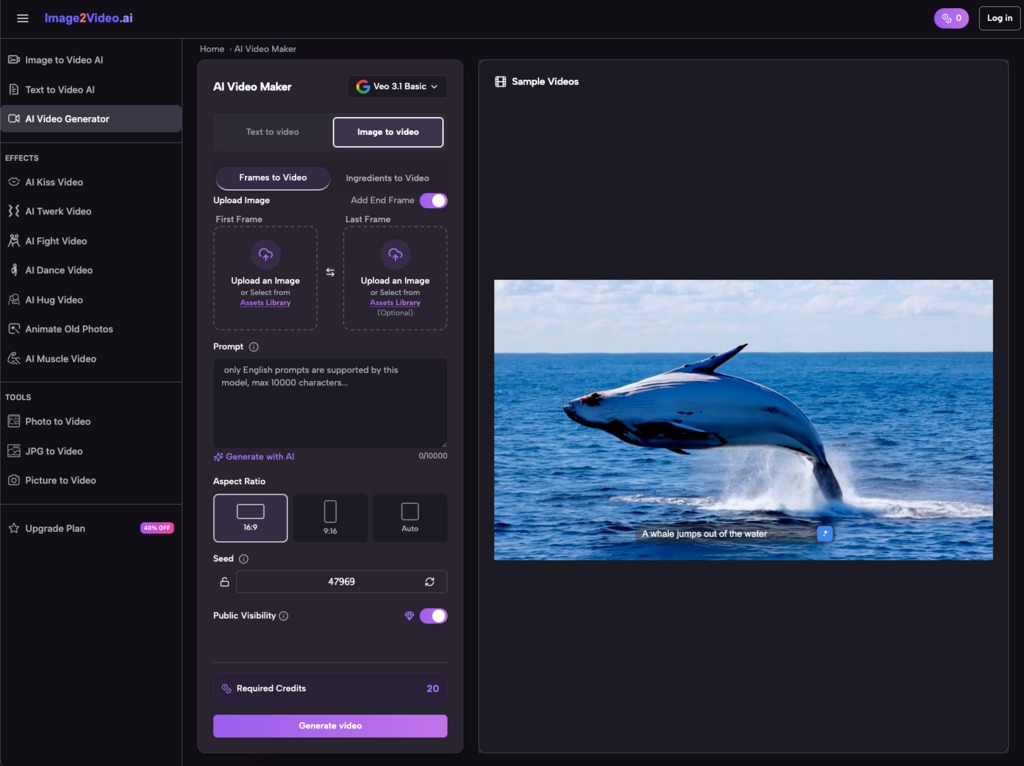
I’ll be honest—when I first heard about Image to Video AI tools, I was skeptical. Another AI gimmick promising to revolutionize content creation? But after watching several small business owners transform their marketing workflows using this technology, I’ve changed my tune completely.
The reality is that small businesses and entrepreneurs face a brutal content creation bottleneck. You need video content to compete on social media, but hiring videographers costs thousands, and learning professional editing software takes months. Image to video technology bridges this gap by converting your existing photos into dynamic videos—no camera crew required.
The Real Problem: Why Small Businesses Struggle with Video Content
Let me paint a familiar picture. You’re running a small e-commerce store selling handmade jewelry. You’ve got gorgeous product photos, but Instagram’s algorithm favors video content. Your competitors are posting Reels daily while you’re stuck with static images. Hiring a video production team would cost $2,000-5,000 per project—money you simply don’t have.
This scenario plays out across industries. A local restaurant has mouthwatering food photos but can’t afford a videographer for weekly social posts. A fitness coach has transformation photos from clients but needs video testimonials to boost conversions. An online educator has slide decks and diagrams but knows video lessons get 3x more engagement.
Traditional solutions fall short. Stock video footage feels generic. DIY filming requires expensive equipment and editing skills. Outsourcing to freelancers creates quality control issues and ongoing costs. Photo to video conversion tools existed before, but they produced slideshow-style results that looked amateurish.
How Image to Video AI Actually Works (Without the Technical Jargon)
Modern Image to Video AI platforms operate differently than old-school slideshow makers. Instead of simply transitioning between static frames, these systems analyze your image content and generate intelligent motion.
Here’s what happens behind the scenes: You upload a product photo. The Image to Video AI identifies the subject, background, and composition. It then applies contextual animations—perhaps a subtle zoom on the product, parallax movement creating depth, or dynamic lighting effects. The result looks like you filmed actual video footage, not just animated a still image.
The process is straightforward:
Step 1: Upload Your Source Image
Most platforms accept standard formats like JPEG and PNG. I’ve tested this with everything from smartphone snapshots to professional product photography—both work fine. The key is starting with decent image quality; blurry photos won’t magically become crisp videos.
Step 2: Describe Your Vision
This is where Image to Video AI gets interesting. You type natural language instructions: “zoom slowly into the product” or “add a rotating effect with warm lighting.” The AI interprets your intent and applies appropriate animations. I’ve found being specific helps—”gentle pan from left to right over 5 seconds” works better than vague requests.
Step 3: Processing Time
Expect 3-7 minutes for the photo to video conversion. Grab coffee while the AI works its magic. The system analyzes your image, generates motion paths, renders effects, and outputs a polished MP4 file.
Step 4: Download and Deploy
Once processing completes, you’ve got a ready-to-share video file. No additional editing required unless you want to add music or text overlays in a separate tool.
Real Success Stories: Before and After Transformations
Case Study 1: E-commerce Product Videos
Maria runs a boutique selling sustainable fashion online. Before discovering Image to Video AI, her Instagram engagement averaged 200 likes per post. She had professional product photos but couldn’t afford ongoing video production.
After implementing Image to Video AI for her product showcases, her engagement jumped to 850 likes per post within three weeks. The animated product videos showed clothing from multiple angles with smooth transitions—creating the illusion of professional videography. Her conversion rate increased 34% because customers could better visualize products in motion.
The cost difference was staggering. Professional video production quoted $3,500 for 10 product videos. Using Image to Video AI, she produced 50+ videos for a fraction of that cost, maintaining consistent quality across her entire catalog.
Case Study 2: Local Restaurant Marketing
Tony manages a family-owned Italian restaurant. He had hundreds of appetizing food photos but struggled to compete with restaurants posting video content. His social media reach was declining month over month.
He started converting his best food photography into short videos using photo to video technology. A simple image of pasta became a dynamic video with steam rising and subtle zoom effects. Within two months, his Instagram reach increased 210%, and table reservations from social media doubled.
The breakthrough came when he realized he could batch-create content. Every Sunday, he’d convert 14 food photos into videos—one for each day of the week across two platforms. This consistency kept his restaurant top-of-mind for local diners.
Workflow Optimization: Integrating Image to Video AI Into Your Process
Smart entrepreneurs don’t just use Image to Video AI randomly—they build it into systematic workflows. Here’s how to maximize efficiency:
Content Repurposing Strategy
Start with your existing photo library. Most businesses have hundreds of unused images gathering digital dust. Convert these into video content for immediate social media fuel. One product photoshoot can generate:
- 5-10 individual product showcase videos
- Behind-the-scenes “making of” content from setup photos
- Customer testimonial videos from before/after images
- Tutorial videos from step-by-step process photos
Platform-Specific Optimization
Different social platforms favor different video formats. Image to Video AI lets you create variations from the same source image:
- Instagram Reels: 9:16 vertical format, 15-30 seconds
- Facebook feed: 1:1 square format, 30-60 seconds
- YouTube Shorts: 9:16 vertical, up to 60 seconds
- LinkedIn posts: 16:9 horizontal, 30-90 seconds
Rather than filming separate content for each platform, convert one strong image multiple ways. I’ve seen this approach cut content creation time by 70%.
Automation and Scheduling
Combine Image to Video AI with scheduling tools like Buffer or Hootsuite. Dedicate one afternoon monthly to batch-converting images. Schedule the resulting videos across the next 30 days. This creates consistent posting frequency without daily content creation stress.
Common Mistakes and How to Avoid Them
Mistake #1: Using Low-Quality Source Images
Image to Video AI enhances motion but can’t fix fundamental image problems. Blurry, poorly lit, or low-resolution photos produce mediocre videos. Invest time in capturing quality source material—good smartphone photography works fine if you understand basic composition and lighting.
Mistake #2: Over-Animating Everything
Just because you can add dramatic zoom and rotation effects doesn’t mean you should. Subtle animations often perform better than aggressive motion. I’ve tested this extensively—gentle pans and slight zooms feel professional, while excessive effects look gimmicky.
Mistake #3: Ignoring Platform Requirements
Each social platform has technical specifications for video uploads. Instagram Reels prefer 1080×1920 resolution at 30fps. TikTok recommends similar specs. YouTube Shorts accepts various formats but performs best with specific encoding. Check platform guidelines before creating content to avoid quality degradation.
Mistake #4: Neglecting Audio Strategy
Silent videos get scrolled past. Most photo to video platforms output video files without audio. Plan to add background music or voiceover in post-production. Royalty-free music libraries like Epidemic Sound or Artlist provide commercial-use tracks that enhance your videos without copyright issues.
Feature Comparison: What to Look for in Image to Video AI Tools
Not all Image to Video AI platforms offer identical capabilities. Here’s what matters for small business use:
| Feature |
Why It Matters |
What to Look For |
| Processing Speed |
Time is money for entrepreneurs |
Under 10 minutes per video |
| Format Support |
Workflow flexibility |
JPEG, PNG input; MP4 output |
| Prompt Customization |
Creative control over results |
Natural language descriptions |
| Batch Processing |
Efficiency at scale |
Multiple simultaneous conversions |
| Mobile Compatibility |
Work from anywhere |
Responsive web interface |
| Pricing Structure |
Budget predictability |
Clear free tier + affordable premium |
Free tiers work fine for testing and low-volume needs. Premium plans make sense once you’re producing 20+ videos monthly. Calculate your cost per video—if it’s under $5, you’re saving dramatically compared to traditional production.
The Cost-Benefit Reality Check
Let’s talk numbers honestly. Traditional video production costs:
- Professional videographer: $500-2,000 per day
- Video editor: $50-150 per hour
- Stock footage: $50-200 per clip
- Equipment rental: $200-500 per shoot
Compare this to Image to Video AI economics:
- Free tier: $0 for 5-10 videos monthly
- Premium plans: $20-50 monthly for hundreds of creation
- Time investment: 10 minutes per video vs. hours for traditional production
For a small business creating 20 videos monthly, the savings exceed $10,000 annually. That’s not counting the opportunity cost of time you’d spend learning video editing software.
Looking Ahead: Where Image to Video AI Is Heading
The technology keeps improving. Current Image to Video AI platforms generate 5-second clips. Next-generation systems will produce longer sequences with more sophisticated motion. We’re seeing early experiments with AI-generated camera movements that mimic professional cinematography.
Integration with other AI tools is coming. Imagine uploading a product photo and having AI generate the video, write the caption, and schedule the post—all automated. This isn’t science fiction; it’s likely arriving within 12-18 months.
The competitive advantage belongs to early adopters. Businesses implementing Image to Video AI now are building content libraries and workflow expertise while competitors still debate whether AI tools are “real” solutions.
Taking Action: Your Next Steps
Start small. Choose 5-10 strong images from your existing library. Convert them using a free Image to Video AI platform. Post the results on social media and track engagement metrics against your typical static posts. I’m confident you’ll see measurable improvement.
The barrier to entry has never been lower. You don’t need technical skills, expensive equipment, or months of training. You need decent photos and willingness to experiment with a new tool.
Image to Video AI won’t replace professional videography for every application. But for small businesses needing consistent, affordable video content, it’s a legitimate game-changer. The question isn’t whether to adopt this technology—it’s whether you can afford to wait while competitors race ahead.