
Tech
AI Humanizer Tools: How to Make AI Writing Sound 100% Natural

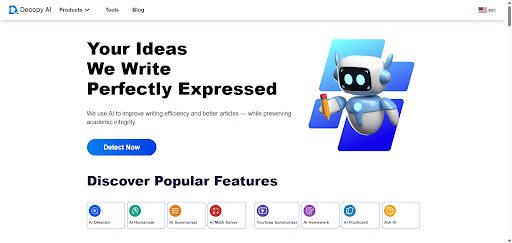
AI writing tools like ChatGPT and GPT-4 have significantly improved content creation efficiency. However, the output often feels mechanical or overly structured — lacking the human nuance readers expect. This is where an AI Humanizer tool becomes essential. Platforms such as Decopy.ai offer powerful humanization features designed to make AI-generated content sound natural, expressive, and reader-friendly.
What Is an AI Humanizer?
An AI Humanizer is a post-editing tool that rewrites AI-generated content to make it sound more human. It improves sentence flow, adjusts tone, replaces awkward phrasing, diversifies structure, and enhances readability. The result is text that feels natural, authentic, and engaging — without losing the core meaning of the original.
This kind of text refinement not only improves user experience but also strengthens SEO performance.
Why AI Humanizer Tools Matter for SEO
- Improved Readability & Lower Bounce Rates
Natural-sounding content keeps readers engaged longer, which sends strong positive signals to search engines. - More Natural Keyword Integration
Humanizer tools can refine AI content while smoothly embedding high-traffic keywords for better ranking. - Stronger E-E-A-T Signals
Search engines value Experience, Expertise, Authority, and Trust. Humanized text appears more credible and trustworthy, enhancing overall content quality. - Reduced AI Detection Risk
As AI detectors become more common, humanized text helps avoid false positives by sounding more organic and varied. - Saves Editing Time
Instead of manually rewriting AI output, humanizer tools automate the process, giving creators more time to focus on strategy and creativity.
How to Integrate AI Humanizer into Your Workflow
- Step 1: Generate a Draft with an AI Writing Tool
Create the initial structure and key points using ChatGPT or other writing assistants. - Step 2: Refine the Draft Using Decopy.ai’s AI Humanizer
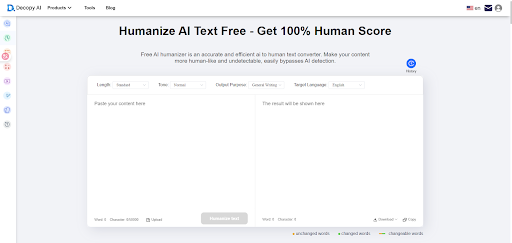
Paste the text into the humanizer tool and adjust tone, style, or complexity based on your goals. - Step 3: Perform Light Manual Editing
Add personal insights, brand voice, and examples to maintain authenticity. - Step 4: Apply SEO Enhancements
Optimize your headings, meta descriptions, keyword density, and linking strategy. - Step 5: Publish & Monitor Results
Track engagement, dwell time, and ranking performance to evaluate improvement.
Best Practices for Using AI Humanizer Tools
- Use the tool as an assistant, not a replacement. Keep your brand voice consistent.
- Avoid over-editing, which may make the text sound unnatural or overly stylized.
- Regularly adjust SEO elements to align with evolving search engine algorithms.
- Review the final output to make sure accuracy and meaning are preserved.
A Practical Example
Imagine you publish 8–10 blog posts per month. Previously, you either wrote everything manually or spent time fixing AI-generated drafts. With Decopy.ai’s AI Humanizer:
- You generate the draft quickly with AI
- The Humanizer transforms it into natural, human-like writing
- SEO metrics improve thanks to better readability
- Your team saves hours of editing time
- More time is freed to focus on strategy, creativity, and research
Final Thoughts
An AI Humanizer bridges the gap between raw AI-generated content and authentic human writing. It improves readability, boosts trust, strengthens SEO performance, and ensures a smoother user experience. For anyone relying on AI to produce content but wanting to maintain a natural, human voice, this tool is a must-have.
If you’re planning to integrate Decopy.ai’s Humanizer into your workflow, start with one piece of content and test the results. You’ll likely see immediate improvements in flow, engagement, and search visibility.

Streamlining Information Retrieval with Disqover Connector Search

Discover Modern Streetwear Style with Guiding Cross

Guiding Cross: Premium Apparel Designed for Everyday Comfort

SD Card Recovery Tool Mac: Free Options to Recover Lost Files Easily

Why Aeration Is the Missing Step in Your Lawn Care Routine

Data Analytics Has Become a Core Pillar of Business Scaling in the UK’s Digital Economy

Why Education Around Consent Is Key in Preventing Misconduct

Why AML Compliance Feels So Expensive

The Essential Cleaning Checklist Before Handing Over Your Property

What Awareness Really Means in Fitness and Why Most People Get It Wrong

Who Is Marlene Knaus? The Untold Story of Niki Lauda’s First Wife

Jacqueline Bernice Mitchell: The Inspiring Story of Jerry Rice’s Ex-Wife

Curious About JOI Database? Read This First Before You Click Anything

Mickey Middleton: The Untold Story of Bryan Cranston’s First Wife

Where Is Barbara Boothe Now? Inside Her Life After Larry Ellison

Wendy Lang: Meet the Therapist Married to Cenk Uygur

Who Is Jasmine Williams? Meet Brad Williams’ Amazing Wife

Where Is Noelle Watters Now? Jesse Watters’ Ex-Wife’s Life After Divorce

Alisande Ullman Today: What Happened After Her Divorce from Leslie Nielsen?

Where Is Tanya Hijazi Now?: All About Rick James’ Former Wife
Streamlining Information Retrieval with Disqover Connector Search
Discover Modern Streetwear Style with Guiding Cross
Guiding Cross: Premium Apparel Designed for Everyday Comfort
SD Card Recovery Tool Mac: Free Options to Recover Lost Files Easily
Why Aeration Is the Missing Step in Your Lawn Care Routine
Data Analytics Has Become a Core Pillar of Business Scaling in the UK’s Digital Economy
Why Education Around Consent Is Key in Preventing Misconduct
Why AML Compliance Feels So Expensive
The Essential Cleaning Checklist Before Handing Over Your Property
What Awareness Really Means in Fitness and Why Most People Get It Wrong
-
 Celebrity9 months ago
Who Is Marlene Knaus? The Untold Story of Niki Lauda’s First Wife
-
 Celebrity6 months ago
Jacqueline Bernice Mitchell: The Inspiring Story of Jerry Rice’s Ex-Wife
-
 Entertainment8 months ago
Curious About JOI Database? Read This First Before You Click Anything
-
 Celebrity7 months ago
Mickey Middleton: The Untold Story of Bryan Cranston’s First Wife