
Connect with us

Technology

Groove to the Future: How to Create Viral AI Dancing Videos with APOB AI for TikTok & YouTube

Published

on

Groove to the Future: How to Create Viral AI Dancing Videos with APOB AI for TikTok & YouTube
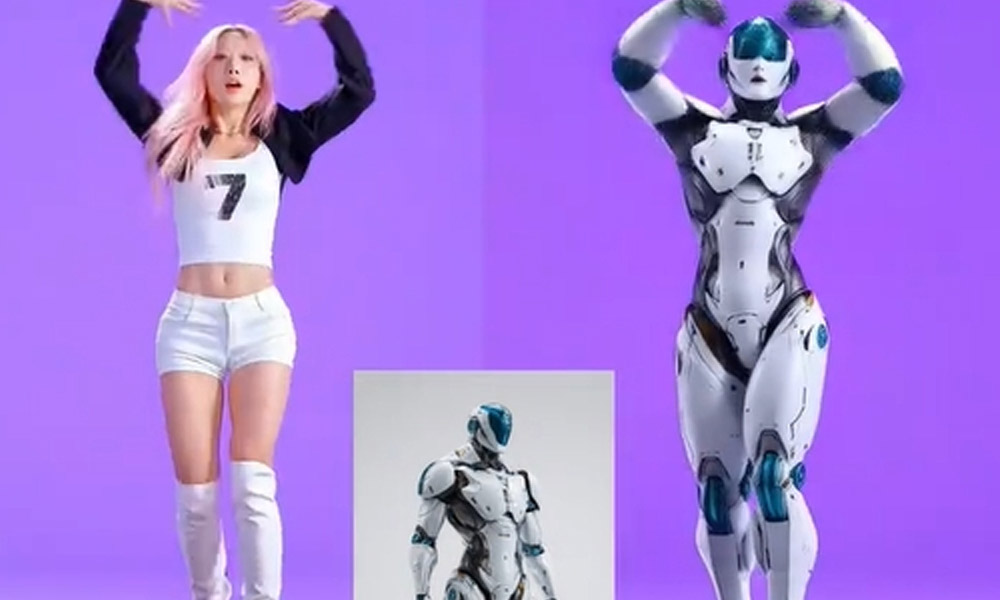
In the fast-paced world of social media, captivating content is king. And what’s more mesmerizing than a dynamic dance routine? But not everyone is a professional dancer, nor does everyone have the time, space, or budget for elaborate video productions. This is where Artificial Intelligence (AI) steps in, revolutionizing how creators can produce engaging dance content.

Among the leading platforms, APOB AI stands out as a powerful and user-friendly tool, allowing anyone to generate stunning AI dancing videos perfect for TikTok, YouTube Shorts, or any other platform. It’s quickly becoming one of the best AI tools for creators looking to make an impact without needing advanced video editing or dancing skills.

Why AI Dancing Videos?

AI-generated dancing videos offer unparalleled advantages for creators:

  • No Dancing Skills Needed: You don’t need to be a professional dancer. The AI does all the heavy lifting by transferring movements.
  • Time-Saving: Generate complex dance sequences in minutes, not hours.
  • Cost-Effective: Avoid expensive studio rentals, choreographers, or camera crews.
  • Endless Creativity: Experiment with countless styles, characters, and scenarios that would be impossible in real life.
  • Anonymity: Create viral content without ever showing your face, perfect for building a faceless YouTube channel or an anonymous TikTok presence.

Introducing APOB AI: Your Ultimate AI Dance Generator

APOB AI is designed with creators in mind, offering intuitive features that make complex AI video generation accessible. It’s not just an image generator; it’s a dynamic platform that can transform your static ideas into vibrant, moving content. While APOB AI doesn’t have a singular “AI Dance Generator” button, it offers powerful functionalities like Revideo, Image to Video, and Text to Video that enable you to produce captivating dancing content.

Key Feature Spotlight: Revideo (Full Body Swap for Dance Transfer)

For creating truly dynamic dancing videos, Revideo is APOB AI’s most revolutionary feature. This powerful tool takes your existing AI character (or any image) and brings it to life by transferring complex body movements from a reference video. Imagine:

  • You’ve created a unique AI portrait using APOB AI’s AI Human Generator or AI Influencer Generator.
  • You find a viral TikTok video or any short clip featuring a dance routine you want your character to perform.

With Revideo, APOB AI can analyze the full-body dance movements from the reference video and seamlessly transfer those exact motions to your chosen AI character. The result is a custom AI dancing video where your AI persona performs the desired choreography, perfectly animated and ready to go viral!

Other Features for Dynamic Dance Content: Image to Video & Text to Video

APOB AI also offers other versatile tools that can contribute to creating dancing videos:

  • Image to Video: Even without a reference dance, you can take a static image of your AI character and apply various subtle animations or movements to create engaging video clips that suggest rhythm and motion.
  • Text to Video: While primarily for dialogue, creative use of this feature can also set a stage for a dancing video, generating an initial scene or character motion before combining with Revideo for the main dance.

How to Create AI Dancing Videos with APOB AI (Step-by-Step)

Generating your dancing masterpiece with APOB AI is a straightforward and enjoyable process:

  1. Log In to APOB AI: Access your account on the APOB AI platform. If you’re new, sign up for a free account to get started with daily credits.
  2. Create or Select Your Star:
    • Generate an AI Portrait: Use the AI Influencer Generator to create a unique, consistent character that will be your dancer. This ensures high-quality, customizable visuals.
    • Upload an Existing Image: Have a specific image you want to animate? Simply upload it.
  3. Utilize Revideo for Dance Transfer:
    • Navigate to the “Revideo” feature within APOB AI’s video tools.
    • Upload Your AI Portrait/Image: Select the character you want to dance.
    • Upload a Reference Video: Provide a short video clip (e.g., a viral TikTok dance, a stock dance video) that contains the full-body dance movements you wish to transfer.
    • Click “Generate,” and APOB AI will process your inputs, generating a video of your AI character performing the dance.
  4. Explore Other Video Features (Optional):
    • Use Image to Video to add general motion or short transitions to your dancing clips.
    • Consider Text to Video for creating intro scenes or character reveals before a dance sequence.
  5. Download and Share: Once generated, download your AI dancing video. Upload it directly to TikTok, YouTube, Instagram Reels, or any platform you choose. Add trending sounds, creative captions, and hashtags to maximize its reach and go viral!

Beyond Dancing: APOB AI for Every Creator

While Revideo is a game-changer for creating dynamic dance content, APOB AI offers a comprehensive suite of tools for all types of creators:

  • AI Influencer Generator: Create consistent digital personas for branding or personal projects.
  • AI Clothes Changer: Easily update your character’s wardrobe for different scenes or themes.
  • Talking Avatar: Make your AI characters speak custom scripts with realistic lip-sync.

APOB AI empowers creators to push boundaries, experiment with new ideas, and produce professional-grade content without needing a film studio. Whether you’re aiming for viral dance challenges, unique storytelling, or innovative marketing campaigns, APOB AI provides the tools to make your vision a reality.

Start Dancing Today!

Don’t let a lack of dancing skills or complex video editing hold you back from creating engaging video content. Dive into APOB AI, experiment with Revideo, and watch your digital creations groove their way to viral success on TikTok and YouTube! The future of content creation is here, and it’s dancing.


FAQs:

Q1: How realistic and accurate is the movement in APOB AI’s dance videos? Can it replicate viral TikTok dances?

A: The accuracy of APOB AI’s Revideo feature is its primary selling point. Revideo uses full-body motion transfer, meaning it analyzes the exact, complex choreography from a reference video (like a viral TikTok dance) and transfers those precise movements to your AI character. Creators report the resulting video is smooth, fluid, and highly accurate motion-for-motion, making it ideal for joining trending challenges.

Q2: I want to build a long-term AI dance influencer brand. Can APOB AI maintain the character’s face and look across dozens of videos?

A: Absolutely. APOB AI is considered one of the best tools for consistent character creation. The platform’s core AI Influencer Generator is designed to maintain your model’s facial structure, proportions, and aesthetic identity consistently across numerous outputs—whether they are images, talking videos, or dancing clips. This stability is crucial for building trust and a recognizable “faceless” YouTube or TikTok brand.

Q3: Is APOB AI easy for beginners? Do I need complex video editing or coding skills to use Revideo?

A: The consensus is that APOB AI is highly accessible. The user interface is straightforward, simplifying what is technically a complex process. Reviewers frequently note a simple three-step workflow: 1. Create/Upload AI Portrait. 2. Upload Dance Reference Video. 3. Click Generate. This ease of use significantly lowers the barrier for content creators who lack professional video editing expertise.

Q4: What is the cost to generate a dancing video? Are there any free ways to test out the Revideo feature?

A: APOB AI is very creator-friendly in terms of cost. Users can sign up for a Free Membership and receive a generous amount of daily free credits (typically 80). These daily credits allow new users to effectively test and generate content using powerful features like Revideo and Image to Video AI, making it a low-risk platform for experimenting with AI video production.

Q5: Can I make my AI dancer speak, or does the tool only handle body movement?

A: APOB AI is an all-in-one platform. After creating a dance video, you can use the Talking Avatar or Lip Sync features to add dialogue. This functionality allows the AI character to deliver monologues, tutorials, or brand messages with smooth, realistic lip-synchronization, enabling you to create complete, professional-grade videos.

Q6: Does APOB AI have other tools to improve the dance video’s look, like changing the costume or background?

A: Yes. Reviewers highlight the AI Clothes Changer feature, which allows you to update your character’s attire (e.g., changing from a casual outfit to performance wear) without losing facial consistency. This gives creators immense flexibility in adapting the dancer’s look to various trends or themes in seconds.


Continue Reading

Categories

Trending

You cannot copy content of this page



