
Blog
Keep Every Device in Your Life Private: The Real Deal on iTop VPN


Look, I get it. You’re tired of hearing about online privacy. Another day, another tech company selling your data. Another news story about a massive hack. Another “expert” telling you to panic.
But here’s the thing—you probably should care. Not in a paranoid, tin-foil-hat kind of way. Just in a “hey, maybe my bank details and personal photos shouldn’t be floating around the internet” kind of way.
That’s where something like iTop VPN comes in. And no, this isn’t another boring tech lecture. Let me break down what actually matters.
What’s iTop VPN?
Think of it like an invisibility cloak for your internet connection. You know how every website tracks where you are and what you’re doing? iTop VPN basically tells them to mind their own business.
The company started in Hong Kong, and they’ve built more than just a VPN. They make screen recorders, data recovery tools, and other software. What makes them different? Well, they’re not trying to be everything to everyone.
The Stuff That Actually Works
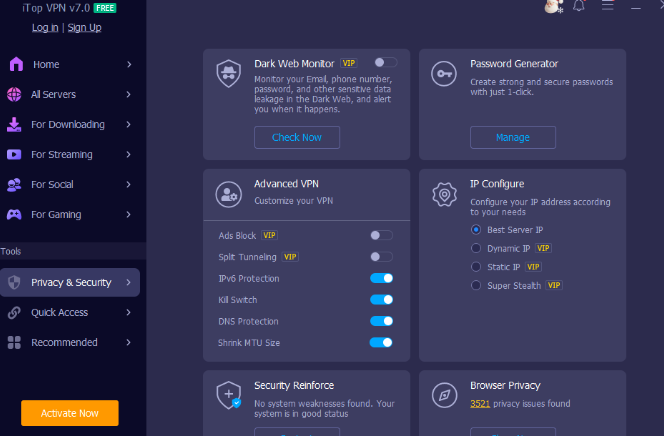
I could bore you with technical specs, but let’s talk about what you’ll actually use.
The AES-256 encryption: Your data gets scrambled into gibberish as it travels. Hackers see nonsense. Your internet provider sees nothing. Even those creepy data brokers can’t track you.
Servers everywhere: They’ve got 3,200+ servers in over 100 countries. Why does this matter? Speed. If you’re in New York and connect to a server in Australia, your internet crawls. Connect to one nearby? Much better.
Kill switch: This one’s crucial. If your VPN connection drops for any reason, this feature disconnects you from the internet immediately. Sounds dramatic, but it prevents that moment where you think you’re protected, but you’re actually not.
Split tunneling: Want your banking app to use the VPN but not your Spotify? You can choose. Some apps need the VPN, some don’t. You decide.
No-logs policy: iTop says it doesn’t log your online activity. Period. Can’t hand over data they don’t have.
Ad blocker built in: Blocks annoying ads and malicious trackers. Your pages load faster, and you see less garbage.
Here’s something interesting—you get to pick your connection protocol. TCP if you want maximum privacy. UDP if you need speed. HTTPS if you’re somewhere with heavy internet restrictions. iTop VPN lets you switch between them easily.
Why You Actually Need This on Multiple Devices
Your phone probably knows more about you than your best friend. Your laptop has your work files, tax documents, and that embarrassing folder of memes you’ve been collecting. Your tablet? Family photos, streaming accounts, shopping history.
Each device is a door into your life. Leave one unlocked and you’re asking for trouble.
The numbers back this up. About 1.75 billion people worldwide use VPNs now—that’s a third of all internet users (Surfshark, 2025). And get this: 93% of organizations use VPN services (DemandSage, 2025). If big companies protecting millions of customers won’t skip VPN protection, maybe we shouldn’t either.
Most of us constantly bounce between devices. You check email on your phone, finish work on your laptop, and watch Netflix on your tablet. Research shows 75% of VPN users protect their desktops, while 69% secure their phones (DemandSage, 2025). Your digital life doesn’t live on just one screen anymore.
Setting It Up (The Non-Techy Way)
Alright, let’s get you protected. This won’t take long.
First, head to iTop VPN official website and download the app. Works on Windows, Mac, iOS, Android—basically everything. Takes maybe two minutes to install.
Create an account with your email. They’ve got a free version if you want to test the waters first—no need to log in.
Now here’s the cool part—one account protects up to 8 devices at once. So install the app on your phone, your laptop, maybe your tablet. Log in with the same credentials everywhere.
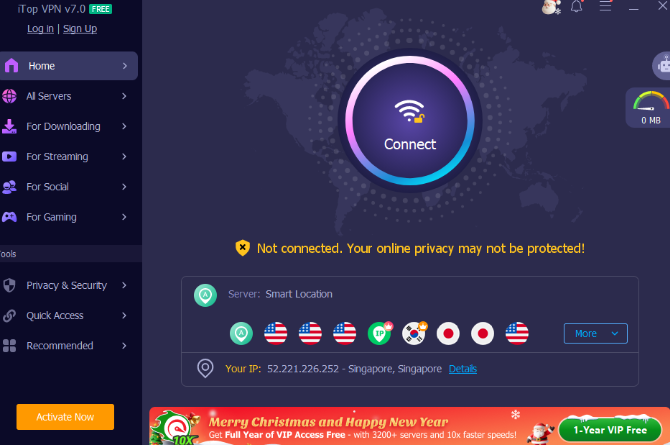
Open the app on any device. You’ll see a big connect button. Hit it. Done. iTop picks the fastest server automatically.
Want to get specific? Browse through their server list. Pick Japan if you’re after anime content. Choose the UK for British streaming services. Or just let it auto-select for best performance.
Customize your settings once. Turn on that kill switch I mentioned. Enable the ad blocker. Set up split tunneling for apps that need it. After that, you can mostly forget about it.
Got a smart TV? Gaming console? Devices that don’t have app support? Install iTop on your router instead. Everything connected to your Wi-Fi is automatically protected. Your Xbox, your smart home stuff, your kid’s Nintendo Switch—all covered without individual setup.
Real Situations, Real Protection
Working from home: Your home Wi-Fi isn’t as secure as you think. And coffee shop Wi-Fi? Might as well hand your passwords to strangers. iTop encrypts everything so nobody can eavesdrop.
Watching stuff: You know how some shows aren’t available in your country? Or how does your internet provider slow down your streaming? iTop handles both. They even have special servers optimized for Netflix, Disney+, and other platforms.
Gaming: Lag ruins everything. iTop has dedicated servers for Minecraft, Call of Duty, and Roblox that minimize latency. Plus, you avoid those annoying DDoS attacks from sore losers.
Family browsing: Kids on iPads clicking everything? One account covers the whole household. Set it up on their devices, breathe easier.
Shopping online: Credit card details traveling across the internet during checkout? Yeah, those need encryption, especially on public Wi-Fi.
Traveling: Airport networks are a hacker paradise. Hotels aren’t much better. Turn on your VPN before connecting to any sketchy place.
Who Should Actually Use This
Remote workers: Especially if you’re handling company data from home. Your employer probably wants you to use a VPN anyway.
Anyone who travels: Seriously, public networks are terrible. Protect yourself or accept that strangers might be reading your emails.
Privacy-minded people: If targeted ads creep you out, if you hate being tracked, if you value your digital privacy—this is for you.
Families: Multiple people, multiple devices, a straightforward solution. Parents especially appreciate the peace of mind.
Heavy internet users: Streaming, gaming, downloading large files—a VPN prevents your ISP from throttling your connection when you use “too much” bandwidth.
People in restricted areas: Some countries block websites and apps. iTop’s HTTPS protocol helps bypass censorship.
Conclusion
Privacy doesn’t have to be complicated. You shouldn’t need to understand encryption algorithms or network protocols to browse safely. iTop VPN does the technical heavy lifting. You click connect. Everything else happens behind the scenes. Over 20 million users worldwide trust iTop products. They’re not all tech nerds. They’re regular people who decided their digital life is worth protecting. Your data has value. Companies know it—that’s why they spend billions trying to collect it. Maybe it’s time you protected it.

The Essential Cleaning Checklist Before Handing Over Your Property

What Awareness Really Means in Fitness and Why Most People Get It Wrong

Premium Street Style Apparel at Tokyo Tiger

Opinioni-piattaforma-in-italia.it: A Complete and Trustworthy Guide for Italian Platform Reviews

The Future of Wearables: The Best Smart Ring from RingConn That Understands Your Body

Liposuction Abroad: Is the Cheaper Price Worth the Greater Risk?

Common Mistakes Traders Make With a Funded Account

Watching Amazon Prime on a Flight: Streaming vs Offline Viewing

What Are Double Wall Disposable Coffee Cups?

Roivenue: The Integrated Analytics Platform That Helps Brands Make Smarter Marketing Decisions

Who Is Marlene Knaus? The Untold Story of Niki Lauda’s First Wife

Jacqueline Bernice Mitchell: The Inspiring Story of Jerry Rice’s Ex-Wife

Curious About JOI Database? Read This First Before You Click Anything

Mickey Middleton: The Untold Story of Bryan Cranston’s First Wife

Where Is Barbara Boothe Now? Inside Her Life After Larry Ellison

Wendy Lang: Meet the Therapist Married to Cenk Uygur

Where Is Noelle Watters Now? Jesse Watters’ Ex-Wife’s Life After Divorce

Who Is Jasmine Williams? Meet Brad Williams’ Amazing Wife

Alisande Ullman Today: What Happened After Her Divorce from Leslie Nielsen?

Where Is Tanya Hijazi Now?: All About Rick James’ Former Wife
The Essential Cleaning Checklist Before Handing Over Your Property
What Awareness Really Means in Fitness and Why Most People Get It Wrong
Premium Street Style Apparel at Tokyo Tiger
Opinioni-piattaforma-in-italia.it: A Complete and Trustworthy Guide for Italian Platform Reviews
The Future of Wearables: The Best Smart Ring from RingConn That Understands Your Body
Liposuction Abroad: Is the Cheaper Price Worth the Greater Risk?
Common Mistakes Traders Make With a Funded Account
Watching Amazon Prime on a Flight: Streaming vs Offline Viewing
What Are Double Wall Disposable Coffee Cups?
Roivenue: The Integrated Analytics Platform That Helps Brands Make Smarter Marketing Decisions
-
 Celebrity9 months ago
Who Is Marlene Knaus? The Untold Story of Niki Lauda’s First Wife
-
 Celebrity6 months ago
Jacqueline Bernice Mitchell: The Inspiring Story of Jerry Rice’s Ex-Wife
-
 Entertainment8 months ago
Curious About JOI Database? Read This First Before You Click Anything
-
 Celebrity7 months ago
Mickey Middleton: The Untold Story of Bryan Cranston’s First Wife