Tech
Sora 2 Prompt Generator: How to Turn Simple Ideas into Cinematic Video
Published
2 months agoon
By
Admin
Having a brilliant video idea is easy, but translating that vision into a language that AI understands is a skill that separates amateurs from professionals. Often, you might type “a futuristic city” and get a generic, lifeless clip because the AI lacks context. Bridging this gap requires structure, vocabulary, and precision.
To help you master this art instantly, using a specialized sora 2 Prompt Generator is essential. It acts as a translator, turning your raw thoughts into the complex, descriptive instructions that advanced models require to generate broadcast-quality video content.
Why Simple Ideas Fail Without Specific Details
AI models like Sora 2 are “literalists” that rely heavily on their training data to fill in the blanks. When you provide a prompt that is too short, the AI defaults to the most generic, average interpretation of your words.
For example, if you simply type “A cyberpunk city,” the AI creates a generic image based on the average of millions of cyberpunk pictures it has seen—usually neon blue and pink buildings with no soul. It lacks specific direction on camera movement, mood, or texture. To get a specific, movie-like result, you must constrain the AI with details.
The “Vague vs. Concrete” Comparison:
| Feature | Amateur Prompt (Fails) | Professional Prompt (Works) |
| Subject | “A woman” | “A cyberpunk hacker with neon-lit dreadlocks and chrome cybernetic eyes” |
| Action | “Walking” | “Striding confidently through a rainy alleyway, splashing puddles, looking over shoulder” |
| Lighting | “Night” | “Volumetric fog illuminated by flickering red holographic advertisements, high contrast shadows” |
| Camera | “Video” | “Low-angle tracking shot, 35mm film grain, anamorphic lens flare, shallow depth of field” |
The S.A.L.T. Formula: A Masterclass in Manual Prompting
To fix vague prompts manually, professional prompt engineers use the S.A.L.T. method. You can use this structure to refine your ideas before putting them into the generator. Think of this as the “syntax” of AI video—if you speak it fluently, the model obeys you perfectly.
1. Subject (Who/What): The Anchor of Reality
The subject is the centerpiece of your video, but AI models are terrible at guessing details. If you aren’t specific, you get a generic “stock photo” look. You must define the texture, age, material, and context of your subject immediately.
- The Rule of Adjectives: Never leave a noun naked. Every object needs at least two descriptors.
- Materials Matter: AI excels at rendering surfaces. Mentioning “brushed aluminum,” “distressed leather,” “translucent silk,” or “weathered stone” adds instant realism.
2. Action (Movement): The Soul of Video
This is where Image-to-Video differs from Image generation. Static prompts create “slideshows” where nothing moves. You must describe the physics of motion and the flow of time.
- Subject Motion vs. Camera Motion: You need to define both. Is the subject moving (running, dancing), or is the camera moving (panning, tracking)?
- Use Active Verbs: Avoid passive words. Use dynamic verbs like “shattering,” “melting,” “sprinting,” “morphing,” or “collapsing.”
3. Lighting (Atmosphere): The Emotional Tone
Lighting tells the viewer how to feel. A “horror” scene and a “romance” scene can have the exact same subject, but lighting changes everything.
- Key Lighting Styles:
- Cinematic: “Volumetric lighting” (god rays), “Rim lighting” (halo effect), “Teal and Orange” (blockbuster look).
- Natural: “Golden Hour” (warm sunset), “Overcast” (soft shadows), “Blue Hour” (twilight).
- Artificial: “Neon noir,” “Clinical fluorescent,” “Strobe lights.”
4. Technical (Camera Language): The Director’s Eye
This is crucial for realism. You need to tell the AI what “lens” it is looking through. This prevents the video from looking like a video game or a cartoon.
- Camera Gear Keywords: “Arri Alexa,” “IMAX,” “GoPro Hero,” “Drone shot,” “Dashcam footage.”
- Lens Characteristics:
- Macro lens: For extreme close-ups of insects or eyes.
- Wide-angle / Fisheye: For massive landscapes or action sports.
- Telephoto: To flatten the background and isolate the subject (bokeh).
- Render Quality: Use terms like “8k,” “Unreal Engine 5 render,” “Hyper-realistic consistency,” and “Sharp focus” to force high-fidelity output.
How SotaVideo Helps You Generate Pro Prompts
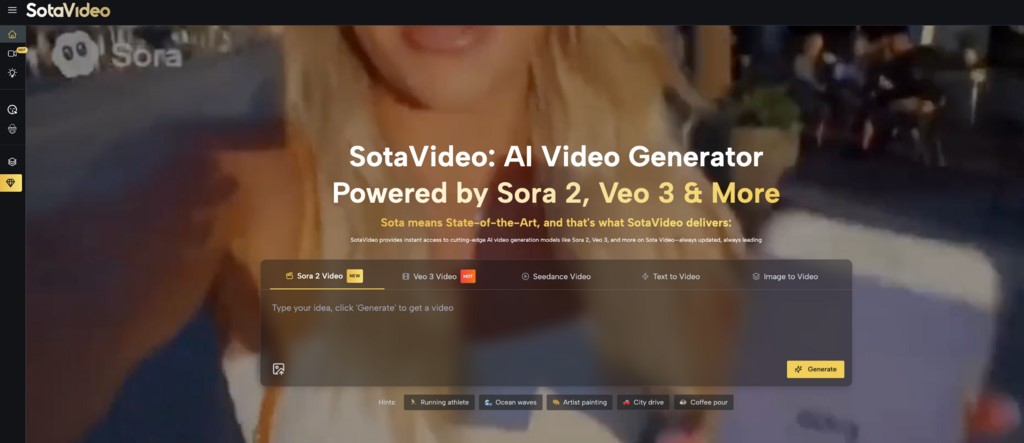
Writing detailed S.A.L.T. Prompts manually for every shot are exhausting. SotaVideo Sora 2 Prompt Generator offers a specialized page that combines visual inspiration with automated expansion to solve this problem.
1. The Smart Content Library
Our page displays a curated feed of high-quality Sora 2 videos as visual cards. If you see a style you like—for example, a specific type of explosion or a camera transition—you do not need to guess how it was made.
- Visual Cards: Each example is displayed clearly with its result.
- “Copy It” Function: Every card features a “Use It” or “Copy It” button. You can instantly copy the proven prompt structure to your clipboard. This allows you to “reverse engineer” viral videos by simply swapping the subject (e.g., change “robot” to “monster”) while keeping the cinematic keywords intact.
2. The AI Prompt Generator
At the top of the page, we provide a powerful “Generate Sora 2 Prompt with AI” tool.
- One-Click Expansion: You simply type a short idea like “Alien landscape,” and our fine-tuned AI expands it into a paragraph-long, technically perfect prompt with all the necessary S.A.L.T. keywords included.
- Daily Free Quota: We display a “3 uses left today” counter to help you track your free daily quota. This encourages you to be strategic and make every generation count before the counter resets, ensuring you get high-value outputs every time without upfront cost.
Common Questions About Sora 2 Prompting
Why is my video blurry or low resolution?
Blurriness often comes from a lack of “resolution” keywords. The Prompt Generator automatically adds terms like “8k,” “sharp focus,” and “highly detailed” to force the model to render high-frequency textures.
Can I use the copied prompts for commercial ads?
Yes. Once you copy a prompt using the “Copy It” button, the resulting video is yours. We recommend modifying at least 20% of the text to make it unique to your brand.
What is the best aspect ratio for Sora 2?
For social media (TikTok/Reels), specify “–ar 9:16” in your prompt. For YouTube or Cinema, use “–ar 16:9”. Our generator tool often includes these parameters automatically based on your selection.
What happens when I run out of daily uses?
The “3 uses left” counter resets every 24 hours. If you are a power user, you can upgrade your plan for unlimited access to the AI generator.
Conclusion
Mastering prompt engineering is the key to unlocking Sora 2’s full potential, but you do not have to do it alone. You no longer need to struggle with writer’s block or waste credits on trial-and-error.
With SotaVideo’s integrated Content Library and smart Prompt Generator, you have an endless source of inspiration and technical precision at your fingertips. Start turning your simplest concepts into Hollywood-grade video sequences today. Don’t let your best ideas remain in your head—use our free tools to bring them to life instantly and dominate the video creation landscape.
Streamlining Information Retrieval with Disqover Connector Search
Discover Modern Streetwear Style with Guiding Cross
Guiding Cross: Premium Apparel Designed for Everyday Comfort
SD Card Recovery Tool Mac: Free Options to Recover Lost Files Easily
Why Aeration Is the Missing Step in Your Lawn Care Routine
Data Analytics Has Become a Core Pillar of Business Scaling in the UK’s Digital Economy
Why Education Around Consent Is Key in Preventing Misconduct
Why AML Compliance Feels So Expensive
The Essential Cleaning Checklist Before Handing Over Your Property
What Awareness Really Means in Fitness and Why Most People Get It Wrong
Who Is Marlene Knaus? The Untold Story of Niki Lauda’s First Wife
Jacqueline Bernice Mitchell: The Inspiring Story of Jerry Rice’s Ex-Wife
Curious About JOI Database? Read This First Before You Click Anything
Mickey Middleton: The Untold Story of Bryan Cranston’s First Wife
Where Is Barbara Boothe Now? Inside Her Life After Larry Ellison
Wendy Lang: Meet the Therapist Married to Cenk Uygur
Where Is Noelle Watters Now? Jesse Watters’ Ex-Wife’s Life After Divorce
Who Is Jasmine Williams? Meet Brad Williams’ Amazing Wife
Alisande Ullman Today: What Happened After Her Divorce from Leslie Nielsen?
Where Is Tanya Hijazi Now?: All About Rick James’ Former Wife
Streamlining Information Retrieval with Disqover Connector Search
Discover Modern Streetwear Style with Guiding Cross
Guiding Cross: Premium Apparel Designed for Everyday Comfort
SD Card Recovery Tool Mac: Free Options to Recover Lost Files Easily
Why Aeration Is the Missing Step in Your Lawn Care Routine
Data Analytics Has Become a Core Pillar of Business Scaling in the UK’s Digital Economy
Why Education Around Consent Is Key in Preventing Misconduct
Why AML Compliance Feels So Expensive
The Essential Cleaning Checklist Before Handing Over Your Property
What Awareness Really Means in Fitness and Why Most People Get It Wrong
Categories
Trending
-
Celebrity9 months agoWho Is Marlene Knaus? The Untold Story of Niki Lauda’s First Wife
-

Celebrity6 months agoJacqueline Bernice Mitchell: The Inspiring Story of Jerry Rice’s Ex-Wife
-

Entertainment8 months agoCurious About JOI Database? Read This First Before You Click Anything
-

Celebrity7 months agoMickey Middleton: The Untold Story of Bryan Cranston’s First Wife