Connect with us

Tech

Tech Review: Best AI Photo Skin Retouching Apps for Portrait Photography

Published

on

Tech

When you shoot portraits, the hardest part is often not the pose or the camera. It is the small skin details that suddenly become impossible to ignore after the photo is taken. A little shine on the forehead, uneven tone across the cheeks, or a breakout that showed up at the worst possible time can pull attention away from an otherwise beautiful image.

That is why interest in AI retouching keeps growing. You want a portrait to look polished, but not fake. You want faster editing while keeping control over the final feeling of the image. The right app can save you time and protect shots you do not want to lose.

Part 1. Why skin retouching feels more personal than most edits

Portrait photography is personal because the subject is the face. People notice skin, eyes, expression, and tone right away. If the edit is too light, the distraction stays there. If the edit is too heavy, the person stops looking real. That tension is why portrait retouching can feel frustrating, especially on mobile.

You may have a perfect smile and the right lighting, but one small flaw keeps pulling your eye back to the same spot. You may love the mood of a cafe portrait, but indoor light reveals texture more harshly than you expected. You may finally get a strong LinkedIn headshot, only to realize the skin looks tired, shiny, or uneven. In all of these cases, the problem is not the whole photo. It is one detail that changes how confident the image feels.

Part 2. What the best AI portrait retouching apps should actually do

The best apps do not erase your face. They refine what is distracting while keeping what looks human. That means smoothing texture without removing every pore, balancing tone without turning the skin flat, and reducing shine without making the face dull. A good result should feel naturally polished, not filtered.

This matters even more when the light is difficult. Neon scenes, mixed indoor light, and bright golden hour portraits often create uneven color across the face. Manual edits can take time, and they often create that waxy look people dislike. A strong app should adapt to the lighting, respect facial structure, and improve the portrait without making it feel over processed.

It should also save you effort. If an app needs too many sliders, masks, or repeated corrections, you stop trusting it for quick work. Good mobile retouching should feel simple enough for everyday use, but good enough for portraits you actually want to post, print, or send to clients.

Part 3. Why Relumi App stands out

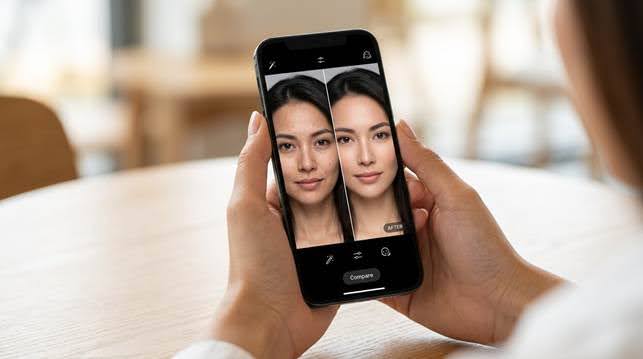
Relumi App stands out because it approaches portrait cleanup as a rescue tool, not just a beauty filter. If you have a photo with good emotion but distracting skin issues, the app is built to help you keep the shot instead of giving up on it.

That is especially relevant if you want an AI retake photo editor that feels fast enough for everyday use. The app is positioned around fixing portraits that still matter to you, whether the issue is shine, awkward facial detail, blur, or a result that simply does not feel polished enough yet.

For readers comparing options in ai photo retouching, the strongest point here is how often the tool is described in natural terms. It aims to smooth texture, balance tone, control oily highlights, and keep real facial detail in place. That is the kind of promise portrait users usually care about most.

What makes this feel useful in real portrait work

You are not always fixing a bad photo. Sometimes you are protecting a good one from being wasted. That is why this kind of tool matters. You can rescue a portrait from rough texture, brighten the overall impression, and keep the expression intact. That feels valuable for event photos, casual portraits, social media content, and professional headshots alike.

Part 4. How to retouch a portrait with AI Retake on mobile

If you want a clean and natural result without building a complicated editing workflow, the AI Retake guide inside the official app process is a good model to follow. The steps below use the official iPhone guide images and show a simple way to improve a portrait while keeping the face believable.

Step 1. Open AI Retake to start your portrait touch up

You start in the app where quick portrait fixes feel simple instead of stressful. This is helpful when you already like the expression in your photo but you know the skin needs a cleaner, softer finish.

Step 2. Choose the portrait you want to improve

Once you select the right photo, you can focus on the shot that matters most to you. This makes sense for portraits because one good expression is often worth saving, even if shine, blemishes, or rough texture show up in the frame.

Step 3. Let AI process the retouching result

This is the step where speed starts to matter. Instead of doing careful manual edits on a small screen, you let the app handle the heavy lifting so the portrait can look cleaner while still feeling like a real person.

Step 4. Review the final portrait and save it

A good retouch should make you feel more confident, not more edited. When you review the final result, the goal is simple. Your skin should look smoother and more balanced, but your face should still look like you.

Part 5. What separates a professional retouch from a fake looking one

The biggest difference is restraint. A professional result does not try to erase every line, every highlight, or every texture pattern. Instead, it removes what distracts from the portrait and keeps what supports the person in the frame. That is why natural skin smoothing usually looks stronger than aggressive smoothing.

You should also pay attention to context. A nightlife portrait should not be edited the same way as a daylight headshot. A group photo should not be treated like a beauty close up. Different scenes create different skin challenges, and the edit should respond to that reality.

This is also where good ai photo retouching feels emotionally useful. When a portrait looks too rough, you may feel disappointed because the moment deserved better. When a retouch looks too fake, you may feel disconnected from your own face. The best result sits in the middle. It helps you look rested, clear, and confident while still feeling honest.

Quick comparison: what you want from a portrait retouch

Portrait situation What usually goes wrong What a good AI fix should do
Indoor portrait Shine and uneven texture stand out Smooth gently and keep natural detail
Neon or mixed light Skin tone turns patchy or harsh Balance tone without flattening the face
Headshot One blemish steals attention Clean the distraction and keep the expression real
Group photo One face needs help more than others Improve the portrait without harming the scene

If you often work with portraits, this balance matters more than any flashy effect. You want speed, but you also want trust. You want smoother skin, but you still want expression, depth, and realism. That is the standard the best apps should meet.

Conclusion

The best portrait retouching apps do more than hide flaws. They help you keep the feeling of a great shot when small skin issues get in the way. They make it easier for you to keep good photos usable without spending too much time fixing them by hand.

If you want a mobile option that feels simple but still capable, Relumi App is easy to notice in this category. It gives you a practical AI retake photo editor workflow, supports natural ai photo retouching, and helps your portraits look cleaner without pushing them into an artificial style. For many people, that is exactly what a skin smoothing app should do.

Continue Reading

Categories

Trending