
Tech
How Small Brands Can Turn Product ImagesInto 3D Marketing Assets With AI

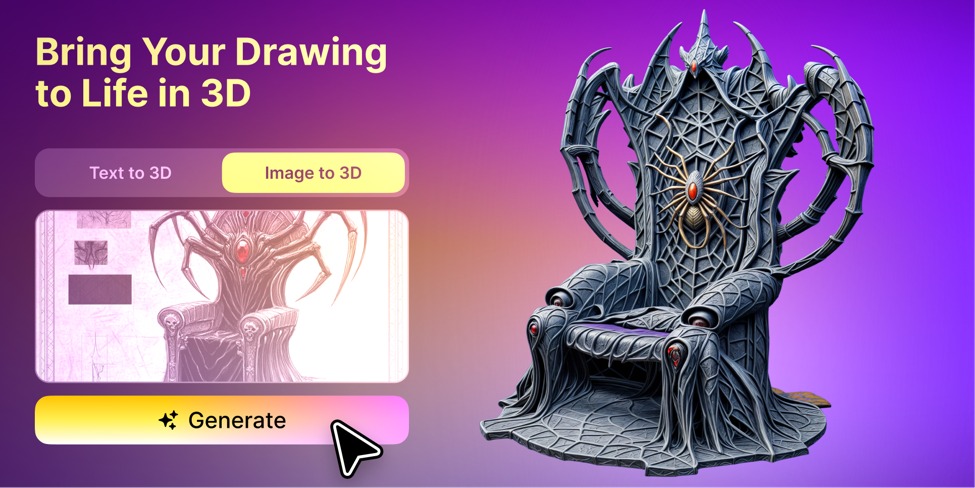
Small brands often need to start marketing a product before the product is ready to photograph. AI-generated 3D marketing assets are textured models created from a sketch, image, or text concept, used for early visuals before a physical prototype exists.A crowdfunding page needs convincing visuals. Retailers and distributors want to understand the concept before agreeing to a meeting. Potential customers may need to see the product clearly before the team feels confident investing in manufacturing.
The problem is that traditional product content usually depends on a finished prototype, a professional photoshoot, or a manually built 3D model. Each option takes time, and the cost can be difficult to justify while the design is still changing.
AI-generated 3D tools offer a useful middle ground.
They can turn an early sketch, reference image, or written concept into a visual asset that is good enough for internal review, market testing, and preliminary marketing content. The result is not a manufacturing file, but it can help a small team communicate an idea much earlier.
Why Product Marketing Often Starts Too Late
Early-stage products may already exist in several forms:
- Hand-drawn sketches
- Packaging designs
- AI-generated product concepts
- CAD screenshots
- Mood boards
- Basic renders
- Written descriptions
These materials are useful for internal discussions, but they are often difficult to turn into customer-facing content.
A sketch shows only one angle. A flat image cannot easily be rotated or relit. A new colour option may require the artwork to be rebuilt. Product photography is impossible until a physical sample exists.
Professional 3D modeling can solve these problems, but commissioning a polished product model typically costs from a few hundred dollars for a simple object to several thousand for a detailed or photorealistic one, and can take anywhere from a few days to about two weeks depending on complexity. That is a hard cost to justify when the team has not yet settled on the final shape, material, or positioning.
AI-generated models can fill the gap between an idea and a finished commercial asset.
Begin With a Clear Product Reference
The quality of the result depends heavily on the source material.
A useful reference image normally includes:
- One main product
- A clear silhouette
- A simple background
- Limited obstruction
- Enough resolution to show important details
- An angle that suggests depth
- Minimal text and decorative effects
A product isolated against a neutral background is generally easier to interpret than the same object inside a busy lifestyle image.
Before generating the model, remove elements that do not belong to the product, such as hands, props, display stands, floating text, or strong background shadows.
The goal is not to create a finished advertisement. It is to give the system a clean description of the product’s visible form.
Turn the Image Into a 3D Starting Point
An image to 3D workflow can convert a product image, sketch, or early render into an initial textured model.
This allows the team to move beyond a single front-facing view. The model can be rotated, placed in a simple scene, or used to create additional marketing visuals.
However, one image does not contain complete three-dimensional information.
It may show the front and one side, but not the back, underside, internal structure, or exact dimensions. The system has to estimate what it cannot see.
For this reason, the first model should be treated as a visual draft.
The team should inspect:
- Overall proportions
- Product thickness
- Rear and side surfaces
- Handles, openings, and small parts
- Texture placement
- Colour accuracy
- Logos and labels
- Missing or invented details
A model does not need to be production-ready to support early marketing, but it should not misrepresent the product.
Use One Asset Across Several Marketing Channels
A useful 3D model can produce more than one image.
The same asset may support:
Multi-angle product visuals
The team can prepare front, side, rear, and detail views without arranging a complete photoshoot.
Simple rotation videos
A slow turntable animation can help viewers understand the full product shape.
Colour and material variations
Several versions can be compared before the final manufacturing direction is approved.
Landing-page graphics
The model can support a hero section, feature explanation, or product overview.
Social media content
Short vertical clips can be created for launch teasers, paid ads, or behind-the-scenes posts.
Crowdfunding pages
The model can help explain a concept before large-scale production begins.
Sales presentations
Retailers, distributors, and investors may understand the proposal more quickly when they can see multiple angles.
This reuse matters to small teams. One asset can support several departments and channels instead of becoming a single disposable visual.
Test Product Directions Before Manufacturing
Early 3D content can also support market validation.
A brand might prepare several versions of the same product and compare:
- Which colour receives more clicks
- Which shape attracts more attention
- Which material feels more appropriate for the audience
- Which image works better in advertising
- Whether viewers understand the product’s purpose
- Which version generates more inquiries or email sign-ups
The payoff from clearer visuals is measurable. In one footwear A/B test, replacing four static product images with a single interactive 3D model raised the add-to-cart rate by 33%. More broadly, about 60% of online shoppers say they are more likely to buy a product shown in 3D or AR, and 3D visuals have been found to lift purchase intent by roughly 29%. This feedback should not replace product strategy, but it can reveal obvious communication problems.
If users consistently misunderstand the model, the product may need a clearer explanation. If one visual direction performs significantly better, the team may choose to investigate it further.
Tools such as Meshy can make these early visual experiments faster, especially when a small team does not have an in-house 3D department.
The value is not simply producing more images. It is creating enough visual material to learn from the market before committing to expensive production decisions.
Keep Concept Visuals Clearly Labelled
If the product is not final, the marketing content should say so.
Useful labels include:
- Product concept
- Preliminary visualization
- Design in development
- Early visual prototype
- Final appearance may vary
This is especially important when a generated model looks highly realistic.
Viewers may assume that every feature, material, and proportion has already been approved. Clear wording prevents an early concept from being mistaken for final product photography.
It also protects trust if the manufactured version later changes.
Can I Use an AI 3D Model for Manufacturing
An AI-generated model may be useful for communication, but it should not automatically move into manufacturing.
It may not contain:
- Correct dimensions
- Functional internal parts
- Manufacturing tolerances
- Accurate material thickness
- Mechanical connections
- Safety requirements
- Verified component placement
Engineers and product designers still need to create or approve the technical files required for production.
The marketing asset explains what the product may look like. It does not prove that the product can be manufactured or used safely.
Keeping this distinction clear prevents early visualization from being mistaken for technical validation.
How Do You Keep Brand Accuracy in an AI 3D Model
Before any generated model is published, the team should check whether it has changed:
- Logo shape
- Brand colours
- Packaging text
- Button placement
- Surface patterns
- Number of components
- Product proportions
- Material appearance
Small text and logos are especially likely to become distorted during generation.
These details may need to be replaced or refined manually before the asset is used in a public campaign.
The closer the model is to a final product claim, the more carefully it should be compared with approved design references.
A Practical Workflow for Small Brands
A simple process can follow these steps:
- Prepare a clear sketch, product image, or concept render.
- Remove complex backgrounds and unrelated elements.
- Generate an initial 3D model.
- Inspect proportions, hidden surfaces, textures, and brand details.
- Correct major visual problems.
- Test several colours, materials, or product directions.
- Create images, videos, and presentation materials.
- Label unfinished products clearly as concepts.
- Test audience response through landing pages, ads, or sales conversations.
- Update the visual asset as verified product information becomes available.
This keeps the process useful without confusing an early model with a final commercial product.
From Product Idea to Market Conversation
Small brands do not always need to wait for a factory sample before discussing a product with customers, retailers, or investors.
A sketch can become a rotating product view. A concept image can become a landing-page visual. One model can support a crowdfunding campaign, social posts, and a sales presentation.
AI-generated 3D makes it easier to move from an internal idea to something the market can understand.
The team still needs to review accuracy, protect the brand, explain what remains conceptual, and involve professional designers before manufacturing.
Used carefully, the technology is not just a faster way to create attractive content.
It is a practical way for small brands to start learning from the market earlier.
Frequently Asked Questions
Can AI turn a product photo into a 3D model?
Yes. An image-to-3D workflow converts a single product photo, sketch, or early render into an initial textured 3D model that can be rotated, relit, and placed in a scene. Tools like Meshy generate this draft model automatically, though it should be reviewed for accuracy before publishing.
Can I use an AI 3D model for crowdfunding visuals?
Yes. An image-to-3D model gives you a rotating product view for a campaign page before a physical sample exists, which matters because Kickstarter projects with video succeed at a much higher rate than those without. The model should be labeled as a concept, since it is a marketing visual and not a manufacturing file.
Is an AI-generated 3D model good enough for marketing?
For early marketing it usually is. A single AI 3D model can produce multi-angle product shots, a turntable video, color variations, and landing-page graphics without a full photoshoot. It should not misrepresent the product, so proportions, hidden surfaces, logos, and labels need a manual check first.
Can I use an AI 3D model for manufacturing?
No. An AI-generated marketing model does not contain verified dimensions, material thickness, mechanical connections, or safety requirements. Engineers and product designers still need to create or approve the technical files required for production.
Should I label AI-generated product visuals as concepts?
Yes. When a product is not final, the visual should carry wording such as “product concept” or “final appearance may vary,” especially when the render looks photorealistic. Clear labeling prevents an early concept from being mistaken for final product photography and protects trust if the manufactured version changes.

Built to Catch a Mistake: A EquityGroups Review

How Accounts Receivable Analysis Helps Businesses Improve Financial Performance

How to Keep Your Tag Heuer Automatic Running Perfectly: A Complete Care Guide

Best Smart Mattress: DeRUCCI, Eight Sleep and Sleep Number Compared

Fixed Income, Variable Markets: What This GrowthDirect Review Tested

Best Perfumes for Men in the UAE Perfect for Evening Wear

How to Choose the Perfect Oval Diamond Engagement Ring: Shape, Style, Gold & Buying Tips

Years Away From the Markets: What a Returning Trader Found When Testing Brent Markets

A Long Term Investor Opens a Trade Account: My Inverset Review

Putting an Inheritance to Work Slowly, With Keystone Wealth Management

Who Is Marlene Knaus? The Untold Story of Niki Lauda’s First Wife

Jacqueline Bernice Mitchell: The Inspiring Story of Jerry Rice’s Ex-Wife

The Best Sales Enablement Platforms to Boost Your Sales Process in 2026

Curious About JOI Database? Read This First Before You Click Anything

Mickey Middleton: The Untold Story of Bryan Cranston’s First Wife

Where Is Barbara Boothe Now? Inside Her Life After Larry Ellison

Who Is Jasmine Williams? Meet Brad Williams’ Amazing Wife

Wendy Lang: Meet the Therapist Married to Cenk Uygur

Where Is Noelle Watters Now? Jesse Watters’ Ex-Wife’s Life After Divorce

Alisande Ullman Today: What Happened After Her Divorce from Leslie Nielsen?
Built to Catch a Mistake: A EquityGroups Review
How Accounts Receivable Analysis Helps Businesses Improve Financial Performance
How to Keep Your Tag Heuer Automatic Running Perfectly: A Complete Care Guide
Best Smart Mattress: DeRUCCI, Eight Sleep and Sleep Number Compared
Fixed Income, Variable Markets: What This GrowthDirect Review Tested
Best Perfumes for Men in the UAE Perfect for Evening Wear
How to Choose the Perfect Oval Diamond Engagement Ring: Shape, Style, Gold & Buying Tips
Years Away From the Markets: What a Returning Trader Found When Testing Brent Markets
A Long Term Investor Opens a Trade Account: My Inverset Review
Putting an Inheritance to Work Slowly, With Keystone Wealth Management
-
 Celebrity1 year ago
Who Is Marlene Knaus? The Untold Story of Niki Lauda’s First Wife
-
 Celebrity1 year ago
Jacqueline Bernice Mitchell: The Inspiring Story of Jerry Rice’s Ex-Wife
-
 Business9 months ago
The Best Sales Enablement Platforms to Boost Your Sales Process in 2026
-
 Entertainment1 year ago
Curious About JOI Database? Read This First Before You Click Anything